
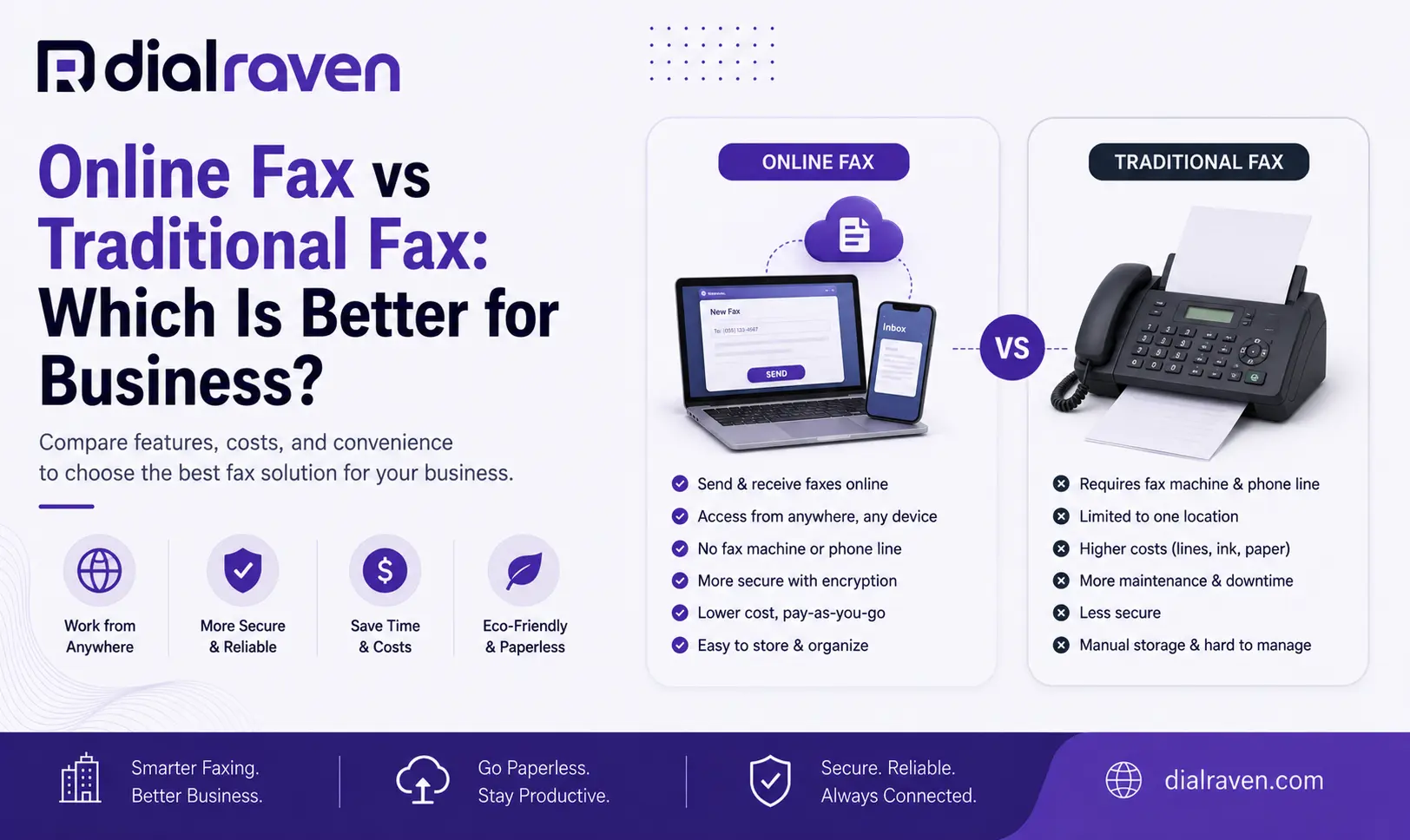
Online Fax vs Traditional Fax: Which Is Better for Business?
Compare online fax vs traditional fax for cost, security, hardware, remote access, number retention, and migration to choose the right setup.
Quick Answer
Online fax sends and receives faxes through email, a browser, or cloud software without a physical fax machine. Traditional fax typically relies on a physical device and phone line. Both can exchange faxes, but online fax is generally easier for remote access, digital storage, and multi-user workflows.
Dial Raven Team
VoIP Communication Expert
A business may still need faxing without needing a fax machine. That distinction is the most important part of the online fax vs traditional fax decision. Traditional fax typically ties document sending and receiving to a physical device, paper workflow, and telephone connection. Online fax moves the employee side of that workflow into email, a browser, or cloud software while preserving the ability to send documents to standard fax numbers.
For many businesses, the real question is not whether fax should disappear. It is which parts of the old fax workflow still provide value. A useful rule is: keep the fax number and compatibility when they matter, and replace the machine, paper, and legacy line when they do not.
Online Fax vs Traditional Fax: Quick Answer
Online fax lets employees send and receive faxes digitally without standing beside a physical machine. Traditional fax normally uses a dedicated fax device connected to telephone service. Both approaches can communicate with fax numbers, but they differ significantly in hardware, remote access, storage, administration, maintenance, and scalability.
Traditional fax can still fit a genuinely paper-dependent workflow. Online fax is generally more flexible when employees need to work remotely, share access, search records, or remove the physical fax machine from the office.
Online Fax vs Traditional Fax at a Glance
| Factor | Online Fax | Traditional Fax |
|---|---|---|
| Physical fax machine | Not required | Usually required |
| Dedicated fax line | Usually not required | Common |
| Send from email or browser | Yes | No |
| Receive digitally | Yes | Usually prints or stores at device |
| Remote access | Strong | Limited |
| Existing fax number | Often portable | Already attached to service |
| Paper and toner | Optional | Usually required |
| Searchable records | Often available | Limited without separate scanning |
| Multiple users | Easier to manage | Device-dependent |
| Maintenance | Software and service focused | Hardware and line maintenance |
| Audit history | Often available | Usually limited |
| Scaling | Add users and numbers digitally | May require additional equipment |
Exact capabilities vary by provider and plan, so businesses should compare actual workflows rather than relying on labels alone.
What Is Online Fax?
Online fax, also called virtual fax, cloud fax, or internet fax, moves the fax process into software. Instead of feeding paper into a machine, an employee can typically open email or a web portal, attach a document, enter the recipient's fax number, send it, and receive delivery information through the software. Incoming faxes can be delivered digitally, often as PDF documents.
Dial Raven's online fax service for business supports sending and receiving through email or browser, allowing the fax workflow to live alongside the rest of the business communications environment.
How Does Traditional Fax Work?
A traditional fax workflow normally follows this path: document → fax machine → telephone or fax connection → recipient fax endpoint. A user places the document into the machine, enters the recipient's fax number, and the device transmits the document.
Incoming documents typically arrive at the physical machine, where they may be printed or stored depending on the device. The technology can still perform its basic job effectively, but the workflow usually depends more heavily on physical equipment, paper, toner, local access, device maintenance, telephone connectivity, and manual filing or scanning.
That is why many businesses evaluate internet fax vs traditional fax even when they have no intention of stopping fax communication itself.
Online Fax vs Fax Machine: What Actually Changes?
Switching to online fax does not necessarily change what outside customers, vendors, medical offices, attorneys, or other recipients do. The biggest change happens inside your organization.
Instead of an employee sending paper through a fax machine, the workflow can become employee → email or browser → fax number. Incoming documents can similarly move from fax number → machine → paper tray to fax number → cloud fax → authorized inbox.
The recipient may still be using a normal fax machine. That is why replacing a fax machine should not automatically be described as eliminating fax. The business may simply be modernizing its side of the workflow.
8 Key Differences Between Online Fax and Traditional Fax
1. Hardware
Traditional fax usually requires a physical machine. That introduces another device to buy, power, troubleshoot, maintain, and eventually replace. Online fax removes that requirement from the normal employee workflow.
2. Phone or Fax Lines
Traditional fax machines commonly rely on a telephone or fax connection. For businesses still using legacy copper services, the fax line can become another item that needs review as carriers modernize their networks.
Dial Raven's business landline shutdown guide explains why businesses should inventory fax machines and other legacy-line uses before old telephone services are replaced. Online fax generally does not require employees to maintain a traditional dedicated fax line at the office.
3. Sending and Receiving
With a traditional machine, someone usually needs access to the device. With online fax, documents can generally be sent and received through digital tools such as email or a browser. This can matter when employees work from multiple offices, home, client locations, or centralized administrative teams.
4. Remote Access
A traditional fax machine is tied to a location. Online fax can make the fax number accessible to authorized employees without requiring them to stand next to one particular machine, which can be especially useful for hybrid and multi-location teams.
5. Document Storage
Paper fax workflows create another document-management problem. Someone must decide whether each document will be filed physically, scanned, shredded, copied, forwarded, or retained. Online fax can make digital storage and retrieval part of the normal workflow.
6. Multi-User Access
A fax machine is one physical destination. Cloud fax can provide authorized access to multiple employees or shared inboxes depending on the provider. That makes it easier to design department-based workflows for accounting, billing, medical records, referrals, administration, legal, or human resources.
7. Administration and Security
Traditional fax creates physical security questions: who can see documents on the output tray, who removes them, where they are stored, and who disposes of them? Online fax changes those questions to digital ones: who can sign in, who can access an inbox, how documents are stored, and what happens when an employee leaves. Neither approach eliminates the need for security controls.
8. Scalability
Adding fax capacity to a traditional environment may mean more devices, numbers, lines, or office-specific workflows. Online fax can make it easier to assign access to additional employees or locations without installing another machine at every site.
Can Online Fax Send to a Regular Fax Machine?
Yes. Online fax is designed to preserve compatibility with normal fax numbers. The sender does not necessarily need to know whether the recipient uses a physical fax machine, another online fax service, a cloud fax platform, or an enterprise fax system.
That compatibility is one of the biggest reasons businesses can modernize their internal fax workflow without requiring customers or partners to make the same change. A traditional fax endpoint can also generally send to a fax number that is managed through an online fax service.
Online Fax vs Traditional Fax Cost
There is no honest universal answer such as online fax always saves a fixed percentage. The better comparison is to identify the cost categories in your existing environment.
| Cost Category | Online Fax | Traditional Fax |
|---|---|---|
| Fax machine | Not normally required | Purchase and replacement costs |
| Dedicated line | Usually not required | Common |
| Paper | Optional | Ongoing |
| Toner or ink | None for fax itself | Ongoing |
| Repairs | No fax-machine repairs | Device maintenance |
| Software or service | Subscription may apply | Line or service fees may apply |
| Storage | Often digital | Physical or separately scanned |
| Additional users | Depends on plan | Limited by machine and workflow |
| Additional locations | Software-based | May need hardware and lines |
When comparing online fax vs traditional fax cost, look at the entire workflow rather than one monthly invoice. A relatively inexpensive telephone line may still support an inefficient process if employees spend time printing, walking documents to a machine, filing paper, troubleshooting transmissions, and distributing inbound faxes manually.
Is Online Fax More Secure Than Traditional Fax?
Not automatically. Online and traditional fax create different security risks.
Traditional Fax Risks
- Documents sitting unattended on output trays
- Unauthorized people viewing paper
- Misentered fax numbers
- Physical file-storage issues
- Improper disposal
- Shared access to one machine
Online Fax Risks
- Weak passwords
- Shared accounts
- Excessive user permissions
- Compromised email accounts
- Uncontrolled forwarding
- Poor retention settings
- Insecure connected devices
So when asking is online fax more secure than traditional fax, the better answer is this: online fax changes the security model; it does not eliminate the need for security controls. Businesses should evaluate transmission security, account access, document storage, audit history, retention, and internal procedures.
What About Healthcare and Regulated Businesses?
Businesses handling sensitive information need to evaluate more than convenience. For healthcare workflows, the HIPAA Security Rule requires regulated entities to apply appropriate administrative, physical, and technical safeguards to electronic protected health information.
- Encryption
- User permissions
- Access logging
- Connected email accounts
- Storage
- Retention
- Vendor responsibilities
- Business Associate Agreements where applicable
- Internal procedures
Dial Raven's HIPAA fax requirements guide covers healthcare-specific fax safeguards and workflow considerations in greater detail.
Can I Keep My Fax Number With Online Fax?
Often, yes, if the number is eligible to be ported to the new provider. For an established business, keeping the current fax number can be important because that number may already appear on forms, vendor records, referral documents, business cards, websites, customer databases, and other records.
A safer migration order is: Configure → Test → Port → Verify → Cancel. Do not cancel the existing fax service first. Dial Raven's online fax service for business supports porting eligible existing fax numbers so businesses can retain the number their contacts already use.
When Should a Business Keep a Physical Fax Machine?
A physical fax machine is not automatically the wrong answer. Keeping one can still make sense when the paper workflow itself is operationally necessary or when another dependency has not yet been validated for cloud fax.
- The physical paper workflow is operationally necessary
- Staff primarily work from paper files
- A connected process has not been validated with cloud fax
- Internet availability makes an online-only workflow impractical
- A contractual or regulated process requires a particular setup
- The machine is being retained temporarily as a migration fallback
The key is to identify whether the machine itself adds value or whether the business simply needs fax compatibility. Those are different requirements.
When Does Online Fax Make More Sense?
- Employees need remote access
- Multiple employees receive the same types of faxes
- The business has several locations
- A dedicated fax line is becoming expensive
- Fax hardware requires frequent maintenance
- Paper and toner management creates unnecessary work
- Digital records are easier for the business to manage
- Incoming documents need to reach several employees
- The business is already moving communications to the cloud
- Legacy copper service is being retired
If fax migration is part of a broader modernization project, Dial Raven's guide to switching from landline to VoIP explains how to inventory voice numbers, fax lines, hardware, and legacy services before changing providers.
How to Move From a Fax Machine to Online Fax
A clean migration should follow a controlled sequence rather than disconnecting the old fax line first.
Step 1: Inventory Your Fax Numbers
Document every fax number in use. Check departments, office locations, old phone bills, printed forms, websites, and vendor records rather than assuming the business has only one.
Step 2: Document Who Sends and Receives Faxes
- Departments
- Users
- Shared destinations
- Document types
- Normal activity
- High-priority senders
- High-priority recipients
This prevents the new platform from simply recreating a badly organized old workflow.
Step 3: Review Storage and Compliance Requirements
Decide who should have access, how long documents should be retained, where inbound documents should go, whether employees can forward them, whether audit records are required, and whether regulated workflows apply.
Step 4: Confirm Fax Number Portability
Verify that required fax numbers can move before cancelling anything. Also confirm the account information and authorization needed for the transfer.
Step 5: Configure Users and Destinations
Decide which employees or departments receive each fax number. For example, a main fax number might route to Administration, a billing fax to Accounting, and a records fax to an authorized records team.
Step 6: Test Outbound Fax
- Confirm the transmission succeeds
- Confirm the recipient receives the correct pages
- Verify delivery confirmation
- Verify sender identity
Step 7: Test Inbound Fax
Send test documents into the new environment and confirm they reach the correct users. Do not test only one direction.
Step 8: Port the Existing Fax Number
When the new workflow is ready, move the number. Keep the previous service active until the transfer is complete.
Step 9: Verify Before Retiring the Old Machine
Run final inbound and outbound tests using the production fax number. Only after those tests should the business consider cancelling the legacy fax line or removing the physical device.
Online Fax Migration Checklist
- Inventory all fax numbers
- Identify the current carrier or provider
- Document departments and users
- Estimate normal fax activity
- Identify email destinations
- Review historical records
- Document compliance requirements
- Confirm number ownership
- Verify number portability
- Configure authorized users
- Test outbound fax
- Test inbound fax
- Verify delivery confirmation
- Complete the number port
- Re-test the production number
- Cancel old service last
- Retain the fax machine temporarily if rollback is required
Online Fax for Accounting and Document-Heavy Teams
Accounting firms are a good example of why fax can survive even after voice communications move to the cloud. A business may still exchange documents with clients, financial institutions, government agencies, insurance companies, or other organizations that continue using fax workflows.
The goal is not necessarily to eliminate the channel. It is to make the channel easier to manage. Dial Raven's accounting firm phone system guide explains how phone, messaging, and document communication can fit into a broader cloud communications setup.
What Happens if the Internet Goes Down?
Online fax requires internet access for employees to send, retrieve, or manage documents through the cloud interface. What happens to an inbound fax during a local office outage depends on the provider's architecture. A cloud service may continue receiving documents at the provider level even while the local office connection is unavailable, but employees may need another internet connection to access them.
- Does the provider continue receiving faxes during a local outage?
- Can employees access faxes from another location?
- Is mobile access available?
- How are failed transmissions handled?
- Are delivery attempts retried?
Continuity should be verified and tested rather than assumed.
Final Verdict: Online Fax or Traditional Fax?
Neither technology is automatically right for every organization. Traditional fax can still make sense where the physical paper workflow itself is valuable. But if your business mainly needs a recognizable fax number, compatibility with normal fax recipients, document delivery, remote access, multiple users, and digital records, maintaining a physical fax machine may no longer be necessary.
The strongest online fax vs fax machine decision is not 'Do we still need fax?' It is 'Which parts of the fax workflow actually need to stay?' For many businesses, the answer is simple: keep the fax number, keep compatibility, digitize the workflow, and remove the hardware and legacy line when they no longer provide value.
Frequently Asked Questions
What is the difference between online fax and traditional fax?
Online fax sends and receives fax documents through email, a browser, or cloud software without requiring employees to use a physical fax machine. Traditional fax normally relies on a fax device and telephone connection. Both can communicate with standard fax numbers.
Do I need a phone line for online fax?
Online fax generally does not require a traditional dedicated fax line at your office. Employees access the service over the internet, although the exact provider architecture and requirements vary.
Can online fax send documents to a regular fax machine?
Yes. Online fax services are designed to send documents to standard fax numbers, so the recipient can continue using a traditional fax machine.
Can I keep my fax number with online fax?
Often yes, if the existing fax number is eligible for porting. Verify portability first, configure and test the new service, complete the number transfer, and cancel the previous fax service only after the port is confirmed.
Can I receive online faxes by email?
Many online fax services can deliver incoming faxes digitally, including as email attachments or through a web portal. Exact delivery options depend on the provider.
Is online fax more secure than traditional fax?
Not automatically. Online fax can add encryption, access controls, and digital audit records, while traditional fax avoids some cloud-account risks but creates physical-document risks. Security depends on provider controls, configuration, user access, and internal procedures.
Can multiple employees use the same online fax number?
Many business online fax platforms allow authorized users or departments to share access to fax numbers and documents. Permissions should be configured so employees only access the information needed for their roles.
What happens to online fax if the internet goes down?
Employees need internet access to use a cloud fax interface. Whether inbound faxes continue to be received and stored during a local outage depends on the provider. Businesses with critical workflows should verify and test continuity procedures.
Still paying for a fax machine or dedicated fax line? Dial Raven can review your current fax number, existing provider, departments, document workflow, number-porting requirements, and broader communications setup before anything is disconnected. Check your fax setup to see whether Virtual Fax is a better fit for your business.
Related pages
Ready to modernize your phone system?
Talk to a Dial Raven specialist and get a plan built around how your team works.